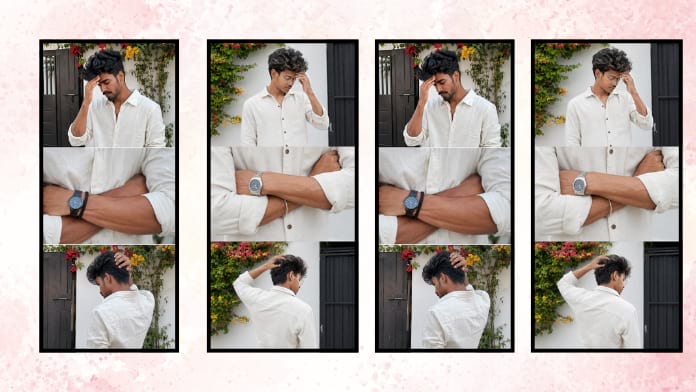
What is a Cinematic Edit Photo
A cinematic edit photo is a style of photo editing that gives images the look and feel of a movie scene. It uses specific color tones, lighting adjustments, shadows, contrast, and mood-enhancing effects to create a dramatic atmosphere. The final image often looks rich, emotional, and highly professional. This style is inspired by film production and cinematic storytelling where every frame looks visually appealing and meaningful.
Why Cinematic Photo Editing is So Popular
The popularity of cinematic photo editing has increased because people want their photos to stand out on social media platforms. Regular images may look simple, but cinematic edits create a premium and artistic feel. Influencers, photographers, and content creators use this style to build a strong personal brand. It helps make portraits more expressive and gives even simple photos a luxurious and creative appearance.
Key Elements of a Cinematic Edit Photo
Several important elements make a cinematic edit successful. Color grading plays a major role, especially using orange and teal tones which are common in movies. Shadows are often deeper, highlights are controlled, and skin tones remain natural. Background blur can also improve focus on the subject. Proper lighting adjustments and contrast balancing create a moody and intense look that makes the image visually striking.
Best Apps for Cinematic Photo Editing
There are many powerful apps available for cinematic edit photo creation. Adobe Lightroom is one of the most preferred tools because of its advanced color grading features. Snapseed is another excellent option for mobile users who want professional editing without complexity. PicsArt and Photoshop also offer strong cinematic editing capabilities. These apps allow users to adjust exposure, tones, shadows, and cinematic presets easily.
How Lightroom Helps in Cinematic Editing
Adobe Lightroom is widely used for cinematic photo editing because it offers complete control over color tones and lighting. Users can create dark moody edits, warm cinematic effects, and high-contrast dramatic portraits using simple tools. Presets in Lightroom make editing faster and more consistent. With proper use of curves, split toning, and HSL adjustments, even beginners can achieve a professional cinematic look.
Cinematic Edit Photo for Portrait Photography
Portrait photography looks especially impressive with cinematic editing. It enhances facial details, improves skin tones, and adds emotional depth to expressions. Dark backgrounds, side lighting, and focused highlights create a strong storytelling effect. Many professional portrait photographers use cinematic editing to give their work a luxury fashion-magazine appearance. This style makes portraits look powerful and unforgettable.
Social Media Impact of Cinematic Photos
Cinematic photos perform extremely well on social media because they attract attention quickly. A well-edited cinematic image increases likes, shares, and profile engagement. Instagram users especially prefer visually rich content that looks professional and unique. For influencers and personal branding, cinematic editing helps create a signature visual identity. It also improves audience trust by making content look polished and high quality.
Common Mistakes in Cinematic Photo Editing
Many beginners make mistakes by over-editing their photos. Too much contrast, unnatural skin tones, or excessive sharpness can ruin the cinematic effect. A good cinematic edit should feel balanced and natural rather than artificial. Another mistake is ignoring the original lighting of the image. Proper editing should enhance the natural photo, not completely destroy its realism. Subtle adjustments usually create the best results.
Tips for Creating Professional Cinematic Edits
To create professional cinematic edit photos, start with high-quality original images. Good lighting during the shoot makes editing much easier. Focus on color harmony and avoid random filters that do not match the mood. Use shadows wisely and maintain realistic skin tones. Learning from movie stills and professional photographers can also improve editing skills. Practice and consistency are the keys to mastering cinematic photo editing.
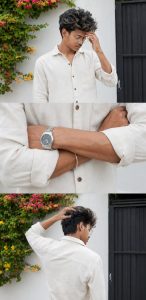
Prompt:
USE MY UPLOADED IMAGE AS REFERENCE FOR THE SAME PERSON, SAME FACIAL FEATURES AND SKIN TONE. ULTRA-REALISTIC IPHONE 15 PRO MAX 3-FRAME COLLAGE (VERTICAL STACK), CANDID SHOTS TAKEN SECONDS APART SAME PERSON, SAME OUTFIT SAME LOCATION
BACKGROUND: PURE WHITE OUTDOOR BOUNDARY WALL AND A DARK GATE RED AND YELLOW CLIMBING FLOWERS ON THE WALL.
TOP FRAME: UPPER BODY SHOT, SUBJECT SLIGHTLY TURNED SIDEWAYS HEAD TILTED DOWN WITH ONE HAND TOUCHING FOREHEAD, NATURAL THOUGHTFUL EXPRESSION, MESSY MEDIUM-LENGTH HAIR FALLING FORWARD.
MIDDLE FRAME: TIGHT CROP OF FOREARMS CROSSED IN FRONT, FOCUS ON VIENS WRISTWATCH AND BRACELET, VISIBLE SHIRT WRINKLES, REAL SKIN TEXTURE AND VEINS, NO FACE.
BOTTOM FRAME: BACK/SIDE ANGLE OF SUBJECT NEAR THE SAME WALL
AND GATE, ONE HAND RAISED TO THE BACK OF HEAD, RELAXED POSTURE, HEAD SLIGHTLY DOWN, PART OF JAWLINE/SIDE PROFILE STILL VISIBLE (FACE NOT FULLY HIDDEN).
OUTFIT: RELAXED FIT OFF-WHITE LINEN BUTTON DOWN SHIRT WITH SLEEVES ROLLED TO FOREARMS, MINIMAL ACC
Final Thoughts on Cinematic Edit Photo
Cinematic edit photo is more than just applying filters to an image. It is about storytelling, emotion, and visual impact. A strong cinematic edit transforms a simple picture into an artistic masterpiece that captures attention and leaves a lasting impression. With the right tools, creative vision, and editing techniques, anyone can create stunning cinematic photos that look like scenes from a professional film.