A Simple Solution for Volume Button Problems
Many smartphone users experience issues with worn-out or broken volume buttons after prolonged use. NoVolume eliminates the need to depend on these physical controls by offering an intuitive on-screen volume management system. This makes the app especially valuable for users whose devices require an alternative method for adjusting sound levels.
Easy-to-Use Interface
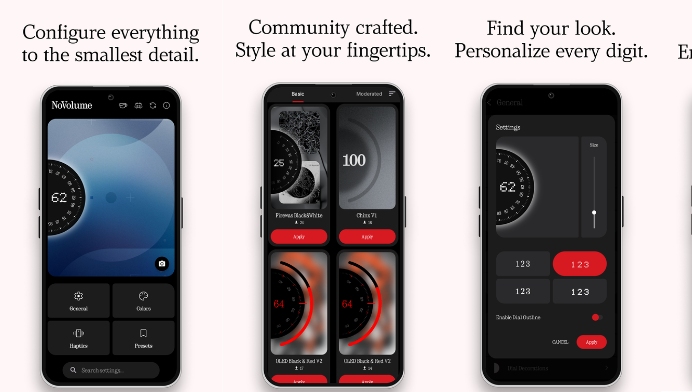
One of the biggest strengths of NoVolume is its minimal and beginner-friendly interface. Every important audio control is clearly organized, allowing users to adjust different sound categories with just a few taps. Even users who are not familiar with advanced smartphone settings can navigate the app comfortably.
Smooth Audio Management Experience
NoVolume provides a seamless way to manage various audio profiles without unnecessary complications. Users can quickly switch between different sound levels depending on whether they are watching videos, listening to music, attending meetings, or using navigation apps. The responsive controls help improve the overall user experience.
Helpful Accessibility Features
The app is particularly useful for people who have difficulty using physical hardware buttons. By moving essential volume controls onto the screen, NoVolume improves accessibility and makes smartphones easier to operate for users with different needs. This thoughtful approach increases convenience while reducing dependence on hardware components.
Lightweight Performance
Unlike many utility applications that consume significant system resources, NoVolume is designed to operate efficiently without slowing down your device. Its lightweight nature ensures smooth performance while maintaining low battery usage and minimal storage requirements, making it suitable for both newer and older Android smartphones.
Compatible with Various Android Devices
NoVolume supports a wide range of Android devices from different manufacturers. Whether you own a budget smartphone or a premium flagship device, the app aims to provide consistent volume control functionality. Regular updates also help maintain compatibility with newer Android versions.
Useful During Hardware Failures
When volume buttons stop working unexpectedly, many users worry about expensive repairs. NoVolume serves as an effective temporary or long-term solution by restoring full control over audio settings through software. This can help extend the usable life of a smartphone while avoiding unnecessary inconvenience.
Privacy and User Convenience
The developers focus on providing a straightforward user experience without overwhelming users with unnecessary complexity. The application concentrates on its primary purpose of volume management, allowing users to control audio settings quickly and efficiently whenever needed.
Why Users Prefer NoVolume
Many Android users appreciate NoVolume because it solves a common hardware problem in a simple and effective way. Its combination of ease of use, reliable functionality, lightweight performance, and practical features makes it a valuable utility app for everyday smartphone use. Whether your volume buttons are damaged or you simply want easier access to audio controls, NoVolume offers a dependable solution.
Final Thoughts
NoVolume is an excellent Android utility application for anyone seeking an alternative way to manage device audio. Its simple design, smooth performance, accessibility benefits, and reliable software-based controls make it a practical addition to any Android device. If you want a convenient method for adjusting sound without depending on physical buttons, NoVolume is certainly worth exploring.