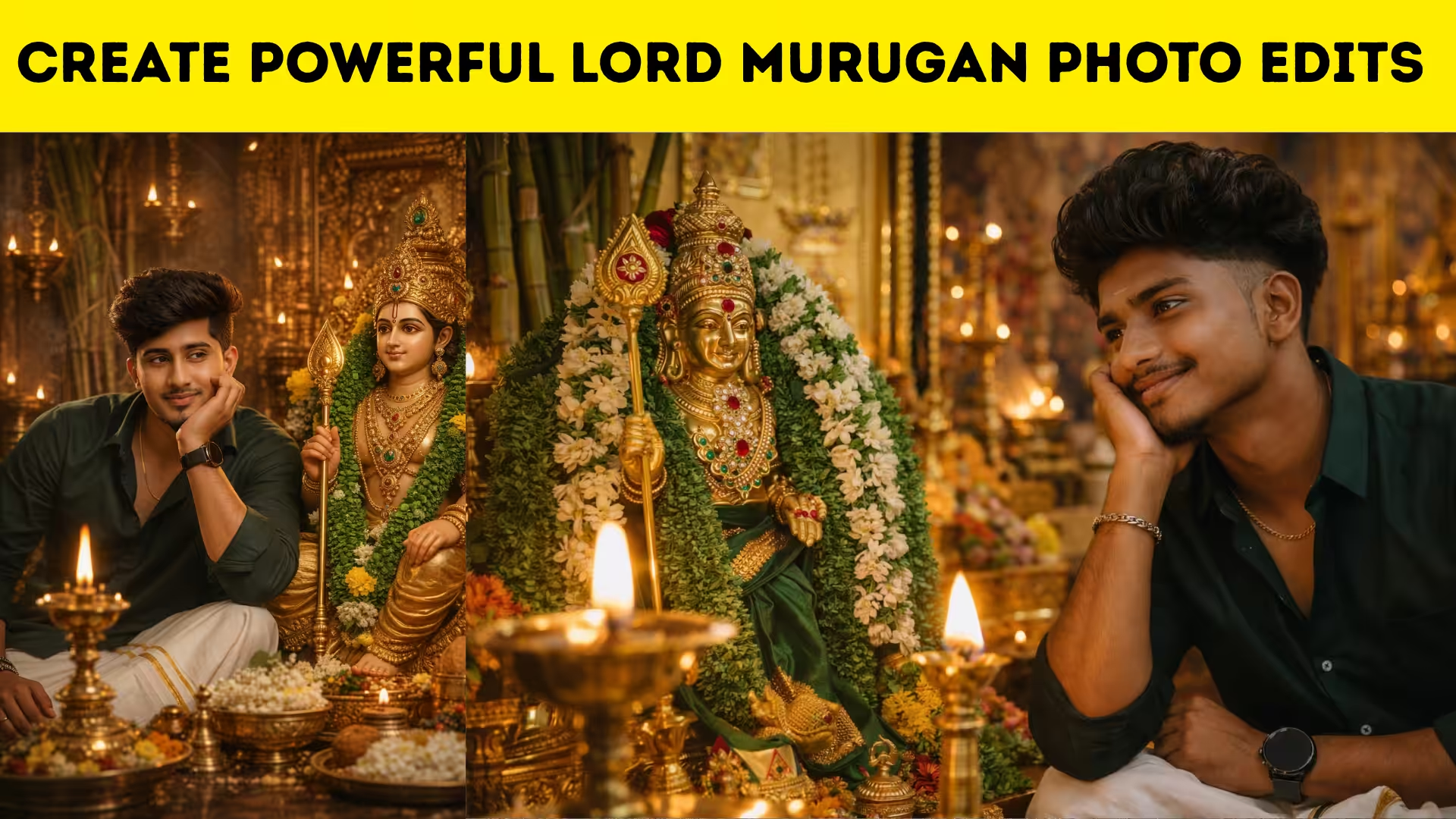
Introduction to Lord Murugan Photo Editing
Lord Murugan photo editing has become very popular among mobile users who love creating devotional images for status posts, festival greetings, thumbnails, and social media content. A simple Murugan image can be transformed into a divine and powerful artwork by using the right editing apps, glowing effects, temple backgrounds, and color adjustments. With mobile editing tools becoming more advanced, creating spiritual designs is now easier than ever.
Why Murugan Photo Edits Are Trending
Murugan photo edits are trending because they create an emotional and devotional connection with viewers. Many people use these edits during Thaipusam, Skanda Sashti, Panguni Uthiram, and other special days related to Lord Murugan. A well-edited photo with divine lighting, golden glow, and traditional background instantly attracts attention and gives a spiritual feel.
Best Mobile Apps for Murugan Photo Editing
Creating Murugan edits on mobile is easy when you use the right apps. PicsArt is very useful for background removal, stickers, and glow effects. Snapseed helps improve details, brightness, and sharpness. Lightroom is great for color grading and tone correction. Canva can help with text design if you want to add devotional quotes, names, or festival wishes. By combining these apps, you can create professional-looking photo edits directly from your phone.
Choosing the Right Lord Murugan Image
The first step in creating a strong Murugan edit is choosing a high-quality image. A clear image with good lighting gives better editing results. Try to select a Murugan photo that already has a strong devotional presence, such as one with Vel, peacock, temple background, or divine pose. High-resolution images make your final design look sharper and more attractive.
Using Backgrounds for a Divine Look
Background selection is one of the most important parts of Murugan photo editing. Temple backgrounds, sky scenes, golden clouds, mountains, and spiritual lighting effects can make the image look more divine. A background should match the mood of the image and should not overpower the main subject. Soft lighting and detailed devotional scenery usually work best for this kind of edit.
Adding Glow and Lighting Effects
Glow effects make Murugan edits look powerful and eye-catching. You can add golden light around the body, bright aura behind the head, and glowing highlights around the Vel. These effects create a divine atmosphere and make the image feel spiritually strong. Blue, orange, and gold shades are commonly used because they give a rich and heavenly appearance.
Enhancing Colors and Details
After adding the background and lighting, color correction is very important. Increase brightness slightly, adjust contrast carefully, and improve sharpness to bring out small details. Warm tones usually work very well for Murugan edits because they create a sacred and glowing feel. You should keep the image balanced so that the colors look rich without becoming too harsh.
Adding Text for Devotional Designs
Many Murugan photo edits include devotional text such as Lord Murugan names, blessings, or festival wishes. Use stylish but readable fonts when adding text. Gold, white, or saffron text colors often look beautiful in devotional designs. Place the text in a clean area of the image so it does not block the main subject or make the design look crowded.
Making Social Media Ready Edits
Murugan photo edits are often shared on WhatsApp status, Instagram posts, Facebook pages, and YouTube thumbnails. For this reason, you should choose the correct size before editing. Square size works well for posts, vertical size is perfect for stories and status, and landscape size is useful for thumbnails or banners. Proper sizing helps your design look professional on every platform.
PROMPT :-
Ultra-realistic cinematic DSLR photo of the exact 24-year-old South Indian man from the reference image — face must be 100% identical (no change in features, beard, skin, hairstyle, age). He wears a dark green shirt (top buttons open), white dhoti, slim gold chain, black round smartwatch, and silver bracelet. Sitting beside a richly decorated Lord Murugan idol with green garlands, gold jewelry, crown, and Vel. He smiles gently, resting his face on his hand, looking at the idol. Foreground has a glowing brass kuthuvilakku. Traditional pooja room with warm golden lighting, lamps, flowers, sugarcane, ritual items. Shallow depth, soft cinematic lighting, HDR, 50mm, f/1.8, ultra-detailed, 4K. 1080 x 1920 pixels (aspect ratio).
Common Mistakes to Avoid
Many beginners use too many effects, which can make the edit look unnatural. Overusing glow, blur, and stickers can reduce the beauty of the original image. Low-quality backgrounds and poor cutouts also affect the final result. It is always better to keep the design clean, balanced, and focused on the divine presence of Lord Murugan. Creating powerful Lord Murugan photo edits on mobile is simple when you use high-quality images, suitable backgrounds, and balanced lighting effects. With a little creativity and practice, you can make beautiful devotional edits that look professional and emotionally powerful. Mobile editing gives you the freedom to create stunning spiritual designs anytime and share them with others in a meaningful way.